
Cleaning up a Power BI model often means working through dozens of repetitive changes to names, formulas and settings. Upside Analytics tested how much of that work Claude Code could do in Tabular Editor 3 on a synthetic semantic model: Tabular Editor kept every edit reviewable until we saved, but our checks still caught two factual errors in Claude's answers.
The question
We wanted to see whether Claude Code could edit a Power BI semantic model in Tabular Editor 3 and whether we could review and undo those edits before saving. We built a retail model with synthetic data, added eight common problems, and opened it in Power BI Desktop. A Power BI semantic model holds the tables, relationships and measures a report uses. Measures are named calculations such as “Total Sales.”
Tabular Editor 3 is a desktop editor for semantic models and now includes an MCP server. The Model Context Protocol (MCP) lets an AI agent such as Claude Code use another program's tools. Through it, Claude edited the model with scripts that Tabular Editor checked and ran. We set read or write MCP server permissions per task and saved changes ourselves.
Renaming tables and columns, then deciding what to keep
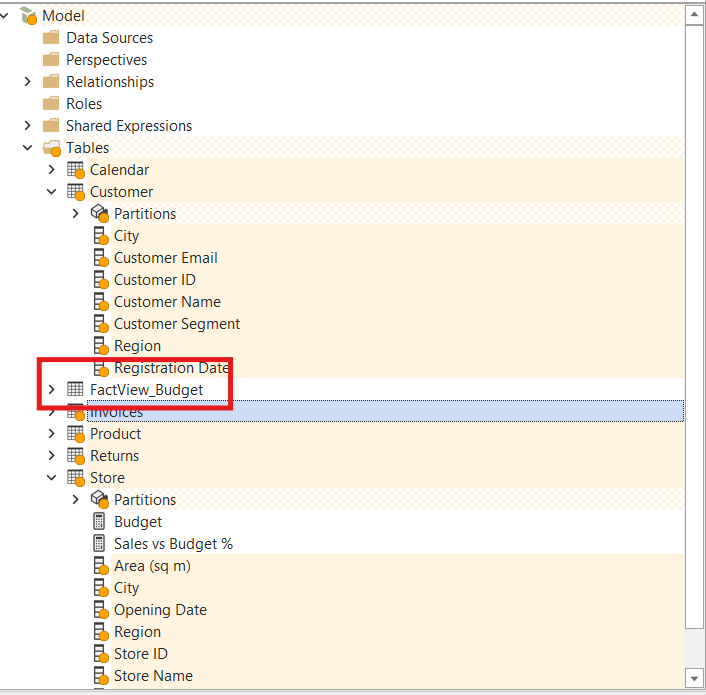
The first edit was familiar: renaming columns such as cust_id to "Customer ID" and dropping technical prefixes from tables. Claude renamed 7 tables and 54 columns in 31 seconds with one script. Tabular Editor updated the references in measures and relationships.
The edits appeared as pending changes, marked in orange, so we checked what we could undo. In our test, Ctrl+Z undid the entire rename script in one step, and Ctrl+Y restored it. Revert worked on one object: reverting the Budget table restored its original name while the other renames stayed in place. Saving applied the changes to the model and cleared the markers. Tabular Editor's MCP server documentation describes the same behavior: one undo entry per agent script, with changes marked until saved.
Checking Claude's answers as well as its edits
Reviewing Claude's answers showed where it had generalized too quickly. Asked for an overview, Claude checked one table, then incorrectly said all nine relationships filtered in one direction. One filtered both ways; asked to check all nine, Claude corrected itself. In the audit, Claude reported 51 columns without descriptions, while Tabular Editor's rule checker showed 54.
Claude also investigated a broken calculation. Our "Sales Last Year" measure was blank for each year but filled in the total. With DAX queries (DAX is the formula language for measures), Claude found the cause: for the 2022 row, the measure asked for 2021 dates while the report still filtered for 2022. No date belongs to both years, so the result was blank.
Claude marked the calendar as a date table and edited the measure. After saving, we confirmed that marking the calendar alone made the original formula work, and the report matched Claude's figures.
Results across the test
The table shows the logged agent time and outcome for each main task.
| Task | Logged agent time | Outcome |
|---|---|---|
| Read-only overview, follow-up and audit | 42 s combined (audit alone: 17 s) | Found all 8 planted problems; reported 51 columns without descriptions where Tabular Editor's rule checker showed 54 |
| Rename tables and columns | 31 s | 7 tables and 54 columns renamed in one script |
| Organize measures | 46 s | 14 measures given readable names, formats and descriptions |
| Fix "Sales Last Year" | 67 s, plus a 17 s check after saving | The report showed prior-year sales for 2022–2026 |
| Reduce model size | 58 s across two runs | Three columns deleted after our approval |
Reducing model size
Claude asked before deleting large columns, then deleted three with our approval and added a Power Query step so a refresh would not restore them. In VertiPaq Analyzer, which reports a model's memory use, the measured size of our synthetic Power BI model fell from 53.53 MB to 31.27 MB, about 42%. Report speed was outside the test.
What it means for your team
Bulk renaming and documentation are good places to start because you can inspect the edits before saving. Claude can also help trace an incorrect result, but check the figures against the report. Check the scope of each edit: in our test, Claude changed all 14 measures when only a single column was selected. In a shared Tabular Editor session, Claude could tell that the model had unsaved changes, but not what had changed or who changed it.
Method and limitations
We ran 8 scenarios in 12 runs on October 29–30, 2026, with Tabular Editor 3.27.1, Power BI Desktop and Claude Code using Claude Sonnet 5.5. Logged agent time was 5 minutes 15 seconds across the 12 runs, excluding setup and manual review. The results cover one synthetic model with 7 tables and 14 measures, not larger or published models. Our instruction to edit only through Tabular Editor did not restrict Claude Code's own file access. If the agent can query model data, query results may be sent to the AI provider configured in the agent, as Tabular Editor's documentation notes.
Sources
- Tabular Editor 3 MCP server: permissions, script review and undo, Tabular Editor documentation, updated October 14, 2026
- TE3 live MCP: Control the TE3 application from any coding agent, Tabular Editor blog, September 24, 2026
- Tabular Editor 3.27.0 release notes, Tabular Editor documentation
- External tools in Power BI Desktop: write operations, Microsoft Learn, updated October 1, 2025